Completing Your Own Blog with Just AI and ALDrive, Without WordPress
Introduction
You want your own blog but don't know how to code?
Don't worry.
We are now in an era where if you say "Make me a blog" to AI, a blog is actually created.
In this article, I will show you how to upload a blog created by AI directly to Dothome free hosting without installing WordPress.
You only need three things.
AI tools, Dothome free hosting, and ALDrive.
1. Why This Method?
The Inconveniences of WordPress
WordPress is an excellent tool. However, if you run it on free hosting, it is slow, plugin conflicts are frequent, and you have to worry about security updates.
For beginners, the barrier to entry is actually high.
The Advantages of a Static HTML Blog
HTML blogs generated by AI are different.
You just need to upload a few files to the server, and that's it.
It is fast, there is no need to worry about hacking, and there is almost nothing to manage.
"But I don't know how to code?"
AI solves that very problem.
If you verbally explain the blog design you want to Claude or ChatGPT, you can receive the completed HTML code.
You just need to upload that file to the server... It works.
2. Gathering Supplies
Before you start, prepare the following three items.
① AI Tool
Use Claude or ChatGPT.
This article explains based on Claude, but ChatGPT can be used in the same way.
② Dothome Free Hosting
Apply for free hosting on Dothome (dothome.co.kr).
You can apply through the "Free Hosting" menu after signing up.
When applying, select "Personal Blog" for "Hosting Purpose."
Approval usually takes a few hours to a day.
The basic specifications of Dothome Free Hosting are as follows.
- Web Capacity: 200MB
- Traffic: 1GB per month
- PHP Supported
- 1 MySQL
- FTP connection available
The specifications are sufficient for operating a personal blog.
③ Install ALDrive
ALDrive is a free FTP program created by ESTsoft.
It has a Korean interface, so even beginners can use it easily.
Download and install it from the official ESTsoft website.
You will likely be familiar with it as it is a program from the same company as ALZip and ALYac.

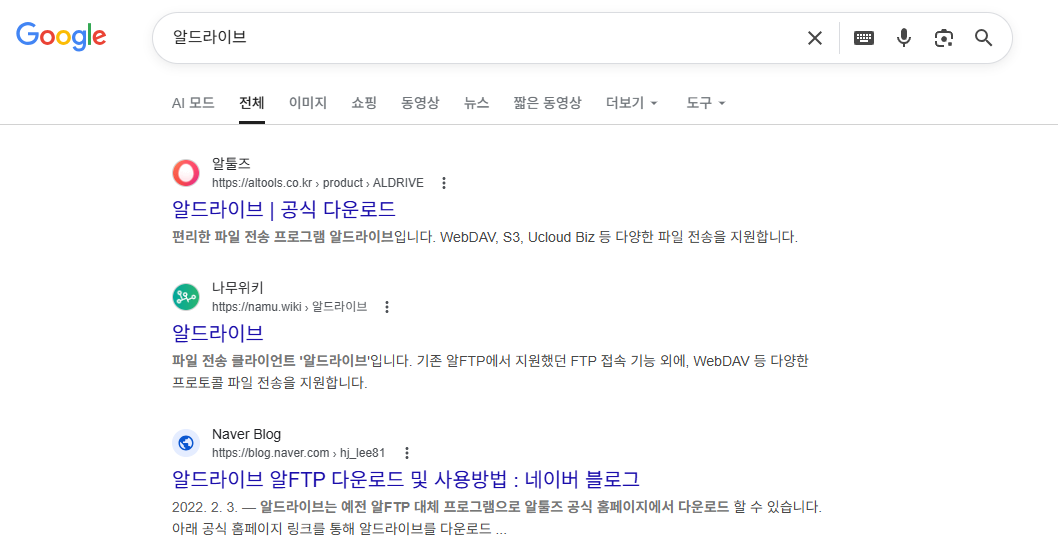
- If you search for ALDrive in the Google search bar, a window like this will appear. Click ALTools at the very top to proceed with the download and installation.
3. Asking AI to Create a Blog
Now for the key step.
Request the AI to create a blog.
Basic Prompt Example
Copy and paste the prompt below into Claude or ChatGPT.
Prompt 1: Create a Basic Blog
Please create a one-page personal blog HTML file. The structure will have the blog name and menu at the top, a list of recent posts displayed in a card format in the center, and a footer at the bottom. Please make it responsive so it looks good on mobile. Include the CSS within the HTML file. Name the blog "My Daily Life Record".When you enter this, the AI will generate the complete HTML code.
Paste that code into Notepad and save the file as index.html.
When saving, you must select UTF-8 as the encoding to prevent Korean characters from breaking.
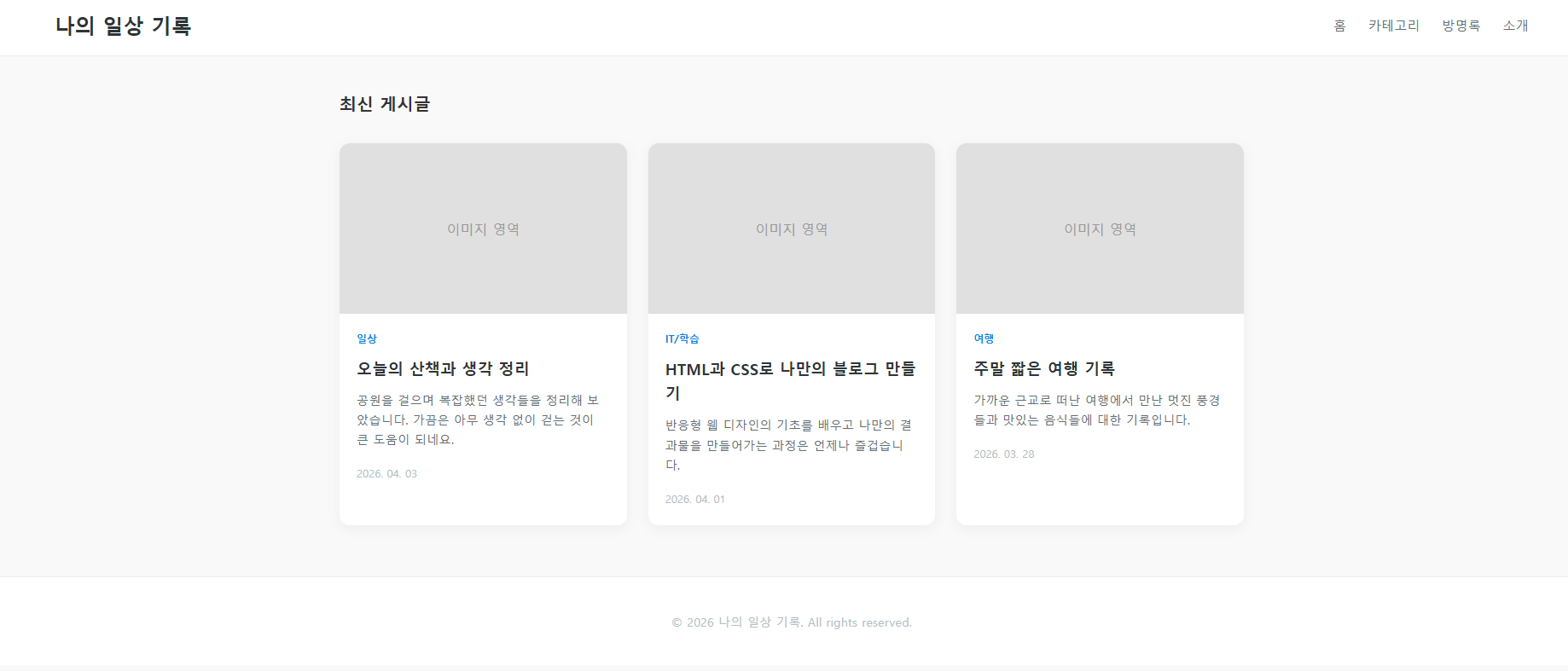
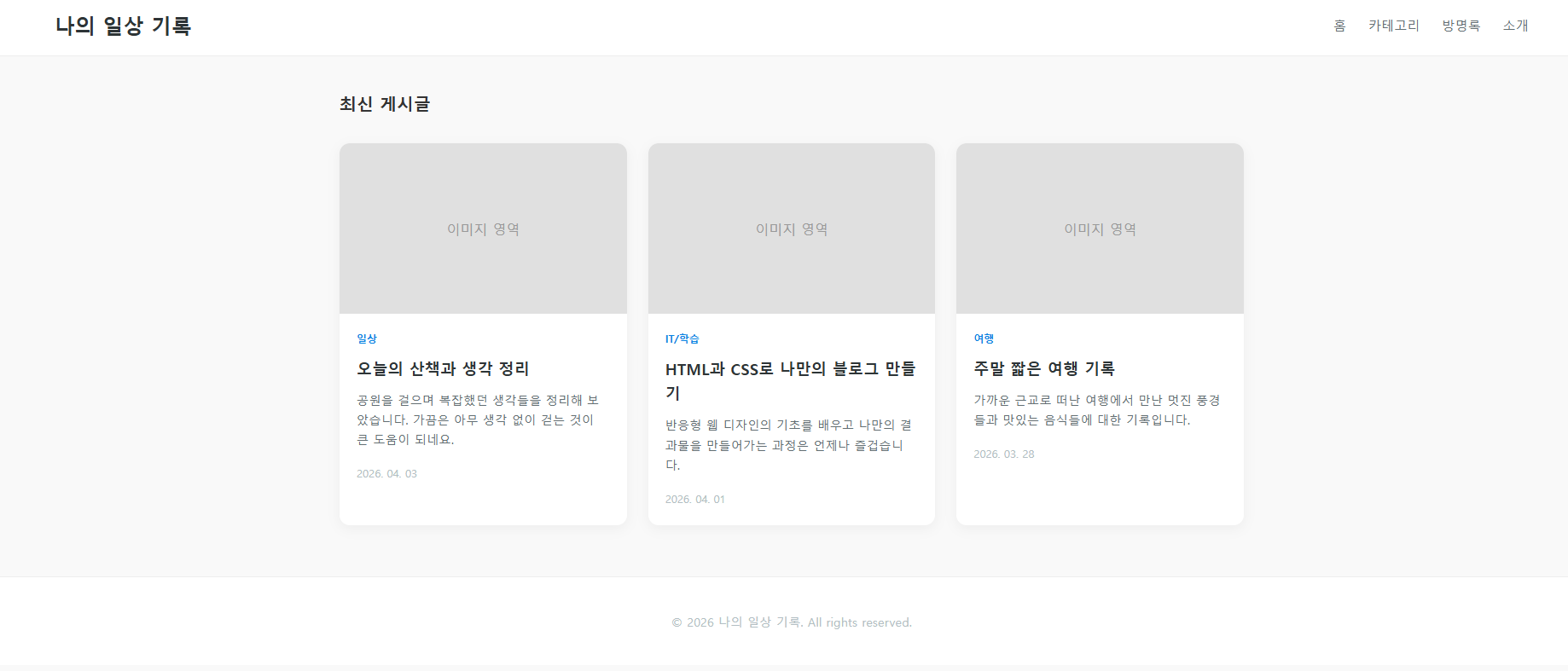
When you open the file saved as index.html in a browser, it looks like this.
Design Edit Prompt
If you are not satisfied with the initial result, request revisions next.
Prompt 2: Change Colors
Change the overall color to a navy blue tone. Make the background light gray.
Prompt 3: Add Feature
Add a category menu. Set the categories to four: "Daily Life," "Restaurants," "Travel," and "Reviews."
Prompt 4: Add Dark Mode
Add a dark mode toggle button to the top right. Make the background dark when the button is pressed.
You can make modification requests like this, as if having a conversation.
You can create the design you want even without any coding knowledge.
4. Connecting to Dothome FTP with Alldrive
If your blog files are ready, it is now time to upload them to the Dothome server.
Check FTP Connection Information
Log in to the Dothome homepage.
My Dothome> Check your hosting information in Web Hosting Management.
The information required for FTP connection is as follows:
- Host (Server Address): The FTP address provided by DotHome
- ID: The ID set when applying for hosting
- Password: The password set when applying for hosting
- Port: 21 (Default)
How to Connect to ALDrive
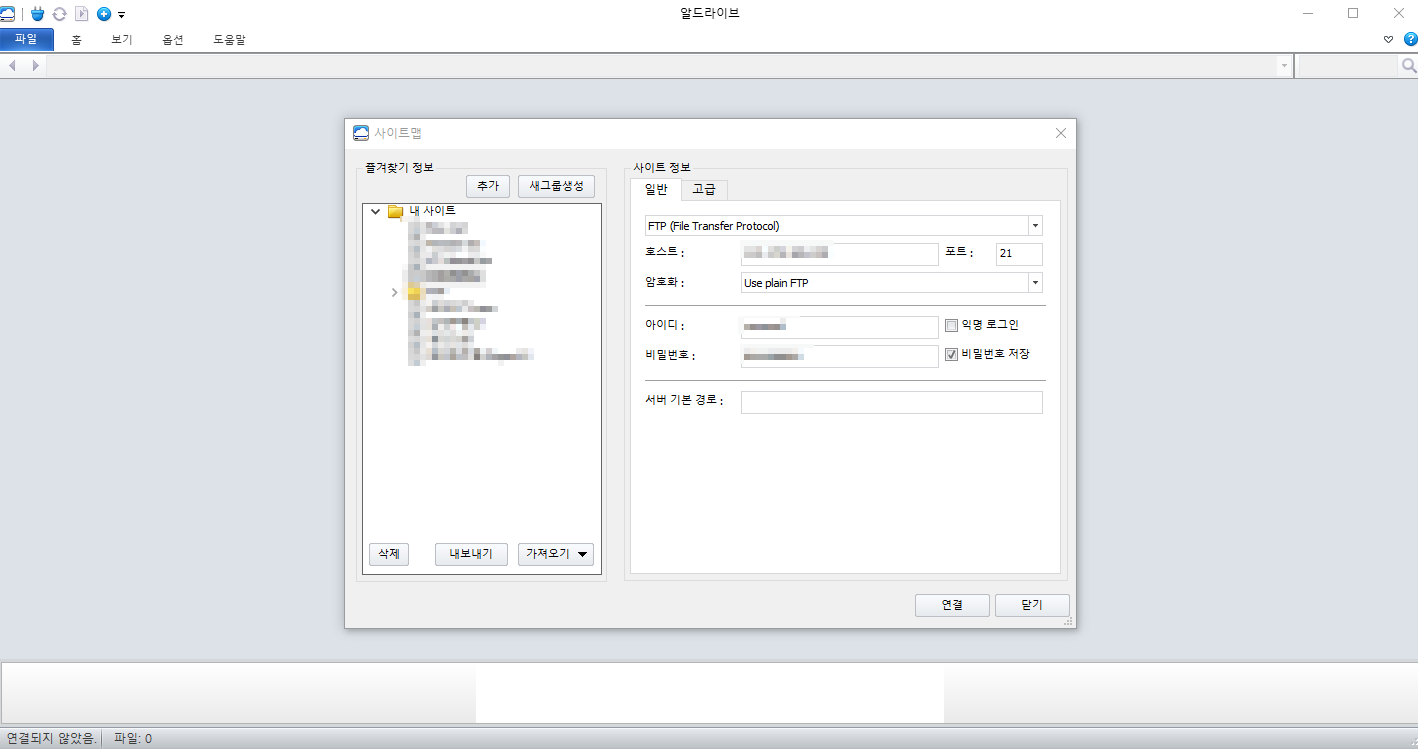
Step 1: Launch ALDrive.
Step 2: Click the "Site Map" or "New Site" button at the top left.
Step 3: Enter the connection information. Enter the Host, ID, Password, and Port in order.
Step 4: Click the "Connect" button.
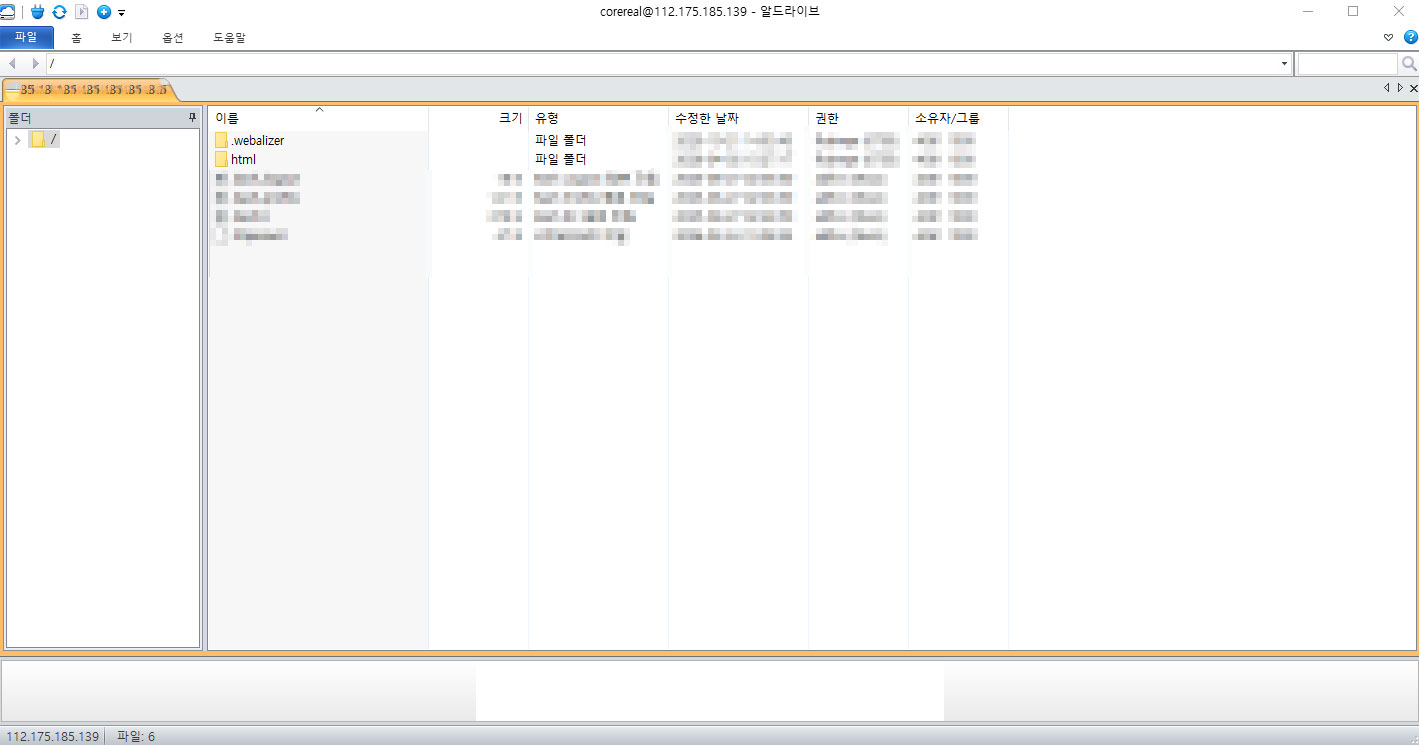
If the connection is successful, files from your computer will be displayed on the left and server files on the right.
File Upload
Find and enter the html folder on the server side.
In the case of Dothome, the
/htmlfolder is usually the web root.If there are existing files in this folder, please back them up.
Find the index.html file you saved earlier on your computer.
Drag and drop the file into the
/htmlfolder on the server side.Once the upload is complete That's it.
5. Checking My Blog
Open a web browser and enter the address provided by Dothome.
The address is usually in the following format:
http://ID.dothome.co.kr
If uploaded successfully, the blog created by AI will appear on the screen.
Congratulations. Your own blog has been uploaded to the internet!
6. How to add a new post
You can also have the AI add a new post to your blog.
Post Page Creation Prompt
Prompt 5: Creating a New Post Page
Please create a post detail page in the same style as the design of the blog below. The title is "Review of a Seongsu-dong Cafe I Visited Today," and the body content is as follows. (Write the post content here) I will name the file post1.html. Please also add a "Return to Home" link at the top. The link address is index.html. Save the code generated by the AI as post1.html. Then, add a link to the corresponding post from the list of posts in index.html. You can leave this task to the AI as well. Prompt 6: Add a new post link to the main page. Add a new post at the very top of the list of posts in this index.html. The title is "Review of a cafe in Seongsu-dong I visited today," and the link is post1.html. Please set the date to April 3, 2026.Re-upload the modified index.html and the newly created post1.html to ALDrive.
This is the entire process of adding posts.
Recommended File Structure
It is a good idea to organize files as the number of posts increases.
We recommend the following structure.
/html├── index.html (Main Page)
├── about.html (About Page)
├── posts/
│ ├── post1.html (Post 1)
│ ├── post2.html (Post 2)
│ └── post3.html (Post 3)
├── css/
│ └── style.css (Common Styles)
└── images/
├── photo1.jpg (Image File)
└── photo2.jpg
If the number of files increases, it is easier to manage if you separate the CSS into a separate file.
You can also do this by requesting the AI to "separate the CSS into a separate file."
7. One Step Further: Decorating the Blog
Once the basic blog is complete, let's upgrade the design.
Try using the prompts below.
Adding an Image Gallery
Add an image gallery page to the blog. Display photos in a grid format and make them enlarged when clicked.Add SNS Links
Add Instagram, YouTube, and email icons to the footer. Allow me to insert links for each.
Visitor Counter
Provide the HTML code to add a free visitor counter.
If you need free images, you can download them from Unsplash (unsplash.com) or Pexels (pexels.com).
You can also upload image files to the images folder on the server using ALDrive.
8. Important Precautions to Know
Dothome Free Hosting Limitations
Dothome free hosting has a storage limit of 200MB and a monthly traffic limit of 1GB.
Storage may fill up quickly if you use a lot of images.
It is recommended to compress images before uploading if possible.
Limitations of Static HTML Blogs
There is no comment function by default.
If you need comments, you can integrate an external service like Disqus.
It is difficult to implement a search function yourself, but if you do not have many posts, category classification is sufficient.
Backups Are Essential
Be sure to keep a copy of the files uploaded to the server on your computer as well.
If you organize the original files uploaded via FTP into folders, it will be useful when you move hosting services later It is convenient.
Wrap-up
To summarize, the entire process is as follows.
- Apply for free hosting at Dothome.
- Ask the AI to generate the blog HTML.
- Upload the file to the Dothome server via ALDrive.
- Check your blog in the browser.
You can create a blog simply by conversing with the AI, even if you know absolutely nothing about coding.
When writing a new post or changing the design, just tell the AI.
Start your own lightweight and fast blog without the complexity of WordPress.
In the next post, we will look at how to add Google AdSense ads to this blog.
We will also cover how to connect a custom domain. It is scheduled. Please look forward to it!